
Are You Accidentally Sharing Client Data with AI? Most Small Businesses Are.
More businesses are using AI every week, and that's a good thing. But there's a data protection problem quietly building underneath all of that enthusiasm, and most people won't know about it until they have to.
This article is about three things: 1) what the free tier is actually doing with your data, 2) what happens when you upgrade but don't set it up properly, and 3) what the newer tools, Claude Cowork and Claude Code, mean for businesses operating in regulated environments.
1) The free tier problem
Most people start with Claude on the free plan - which makes sense. But the free tier comes with a condition most users click past: Anthropic can use your conversations to help train its models.
If you, or anyone in your team, has been pasting in client emails, financial records, HR notes, or anything containing a real person's information, you may already have a GDPR compliance issue.
Upgrading helps, but only if you configure it correctly
Moving to a paid plan (Claude Pro, Team, or Enterprise) changes the data handling terms. On paid plans, Anthropic does not use your conversations for training by default.
But there is a catch.
There is a setting called "Help improve Claude" that, if left on (the default, of course!), overrides this. Many users upgrade and never touch it. The result is that they believe they are protected when they are not.
The fix is straightforward: Settings > Privacy > Help improve Claude > turn it off.
It takes 60 seconds. But you have to know to do it.
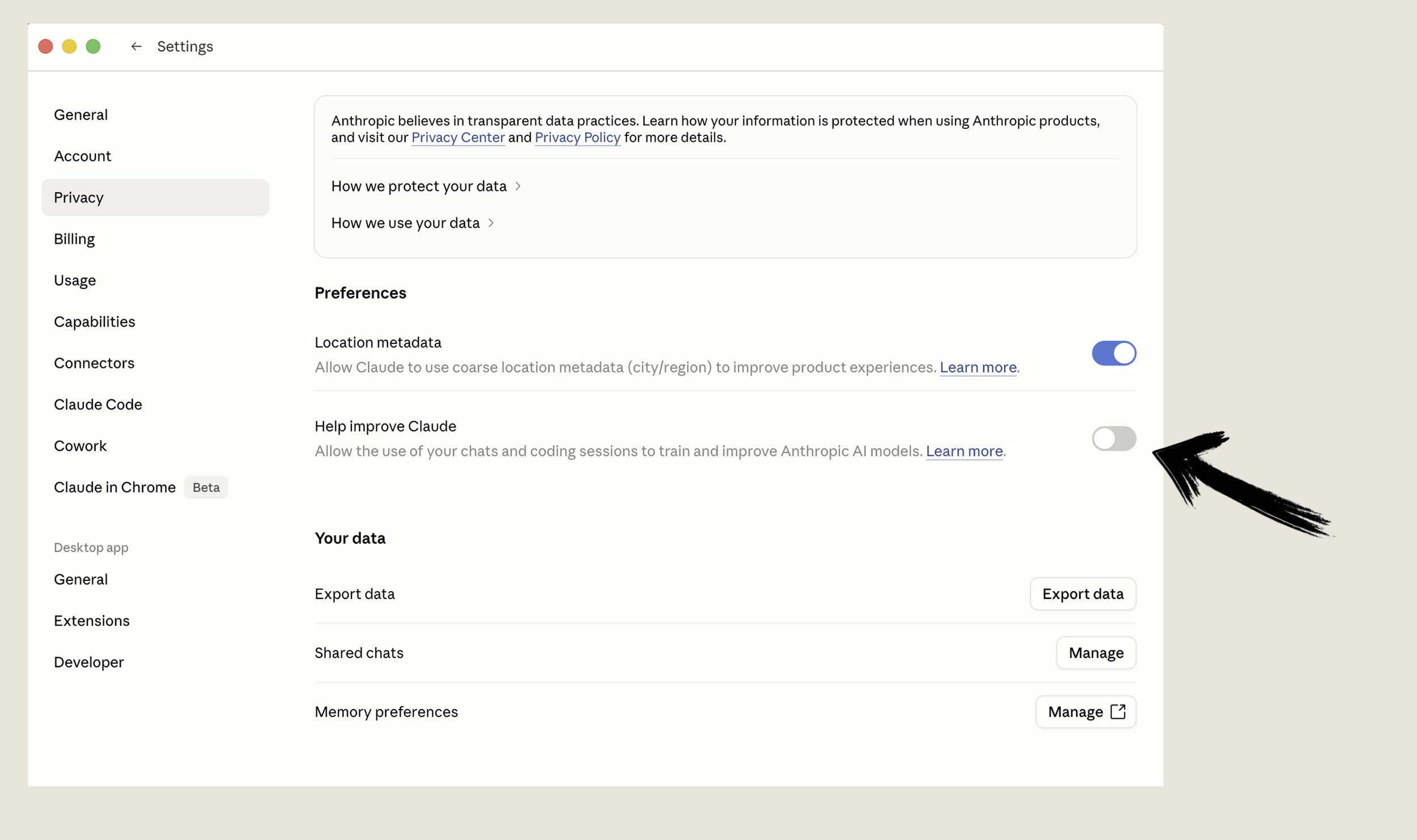
Where to find the “Help improve Claude” setting.
Cowork and Claude Code: a more complex picture
In early 2026, Anthropic launched two new products that significantly expand what Claude can do.
Claude Cowork is a desktop agent. It can read and write local files, browse the web, manage scheduled tasks, and interact directly with applications on your computer. It is designed for non-technical users who want Claude to complete work autonomously, not just respond to prompts.
Claude Code is aimed at developers and allows Claude to write, run, and ship code directly from a terminal.
Both are powerful. Both carry risks that go beyond the settings issue above.
The ‘kicker’ - especially for businesses operating in regulated sectors: Cowork activity is not captured in Anthropic's audit logs, compliance API, or data exports. This applies across all plan tiers, including Enterprise. Anthropic says this explicitly in its own documentation.
What that means in practice: if Cowork opens a client file, drafts a document using confidential information, or accesses data on your machine, there is no centralised compliance record of that activity.
For an accountancy firm, a solicitor, or a financial adviser, that is a significant gap. GDPR, ISO 27001, and FCA rules all require documented records of how personal data is processed. A tool that acts on your data but leaves no auditable trail does not meet that bar, regardless of how capable it is.
Enterprise users can route Cowork activity to their own monitoring systems via OpenTelemetry, but that requires technical infrastructure most small businesses do not have.
What to do now
If you are using Claude in any form for business purposes, three things are worth doing this week.
First, check your plan and your settings. If you are on the free tier and handling any client data, upgrade and turn off the training setting immediately.
Second, find out what your team is doing.
Third, if you are in a regulated sector and you are looking at Cowork or Code as part of your workflow, get proper advice before you connect them to anything sensitive. The capability is real. The governance frameworks are still catching up.
This is not a reason to avoid AI. It is a reason to use it properly.
